The Best Digital Timer Apps for Productivity
Hey, I am Matthew Anderson. I am the founder of Random Timer app that can help you a generate unique random time durations for playing games or working out.
A digital timer app can be an incredibly useful tool for improving productivity and time management.
With just a few taps, you can set a countdown timer for any task or activity. The best digital timer apps provide customizable settings, alarm sounds, and reporting features to help you stay on track.
In this article, we will discuss the Top 5 digital apps.
Top 5 Digital Timer Apps
Here are 5 of the top rated and most popular digital timer apps available in 2023:
1. Random Timer
Random Timer offers a visual approach to timers for the visually oriented. As the timer counts down, the circle moves in a clockwise manner, providing an intuitive display of the time remaining.
The highly configurable app includes countdown presets, alarm options, and hide countdown features. You can use the timer from the website - https://randomtimer.org/
Price: Free; $2.99 for Mobile app
Platforms: iOS, Android, Windows

2. Timer by xFunLab
Timer by xFunLab is a highly customizable clock timer app. You can name timers for easy reference and set up multiple concurrent timers with different alarm sounds.
The app tracks time spent on each labeled timer so you can analyze your activity. Additional features include random timers, stopwatch mode, and optional vibration alerts.
Price: Free with optional in-app purchases
Platforms: iOS, Android
3. Due - Reminder and Timer App
Due provides a combination of reminders, timers, and calendar functions. The app excels at flexible timer options, allowing you to set intervals down to the second, have timers repeat daily, and snooze timers. Due also lets you link timers to reminders for related tasks and features a slick user interface.
Price: Free with $29.99/year subscription for premium features
Platforms: iOS, Android
4. Forest - Stay Focused
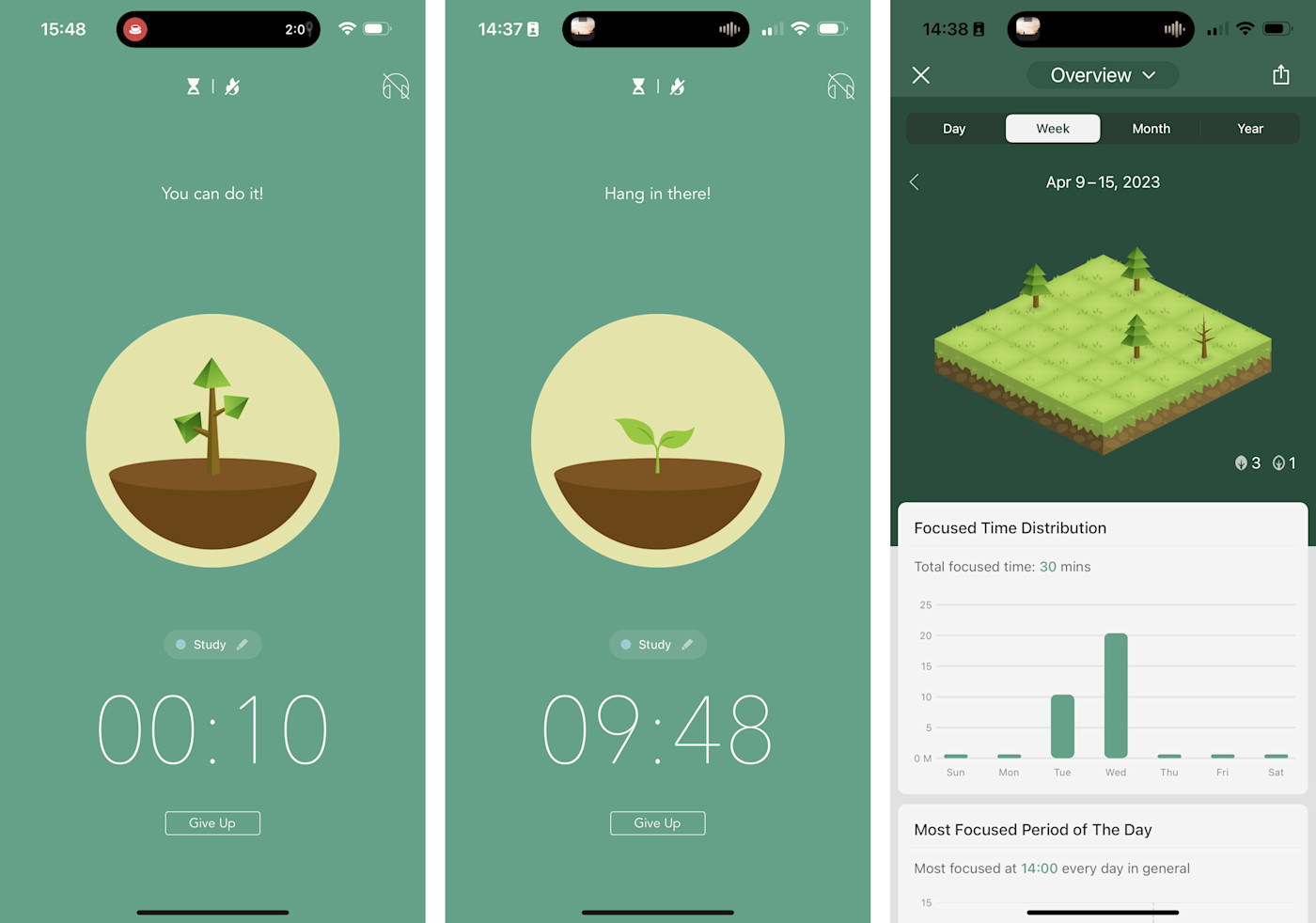
Forest app is a gamified approach to time management. You set a timer and plant a virtual tree that grows over the set period. Breaking your focus early kills the tree, creating motivation to stay on task.
Forest also lets you block distracting apps while the timer runs. For competitive types, public leaderboards display the users with the most trees grown.
Price: Free with $2.99 monthly subscription
Platforms: iOS, Android

5. Be Focused Pro
Be Focused Pro is designed for goal-oriented users who want to track productivity. You define tasks, set times, and start timers. The app tracks your activity so you can run reports on your progress. Additional features include blocking distracting websites and apps while the timer runs. An online community provides motivation and support.
Price: $4.99
Platforms: iOS, Android, Mac, Windows
Why Use a Digital Timer App?
Digital timer apps provide several advantages over using the basic timer on your phone or watch:
Customizable Time Intervals
Most digital timer apps allow you to set very specific time intervals, down to the second. This level of customization enables you to match the timer precisely to the task at hand.
Multiple Simultaneous Timers
With a digital timer app, you can run multiple countdown timers simultaneously. This makes it easy to switch between tasks efficiently.
Alarm Options
When the timer goes off, most apps provide optional sounds and alerts to grab your attention. This prevents you from losing track of time absorbed in a task.
Data Tracking
Many digital timer apps can track your activity over time and provide reports on your most productive times of day. Reviewing this data can help optimize your schedule.
Portability
As smartphone apps, digital timers are portable and accessible anywhere at any time. This makes them convenient to use wherever your tasks take you.
Frequently Asked Questions
Here are answers to some commonly asked questions about digital timer apps:
Ques 1: How do I choose the right digital timer app for me?
Ans: Consider what features are most important for your needs, like customization options, multiple timers, alarms, reports, blocking distractions, etc. Also check app ratings and reviews for real-world user feedback. Most timer apps offer free versions to test out the features before upgrading.
Ques 2: Can I use a digital timer app without internet connectivity?
Ans: Yes, most digital timer apps for smartphones will work offline without an internet connection once you download the app. However, any syncing or reporting features would require internet connectivity.
Ques 3: Are digital timer apps accurate in their timekeeping?
Ans: Digital timer apps rely on the internal clock of your mobile device. The timekeeping is generally quite accurate on modern smartphones and apps, on par with a mechanical timer. Using an app is more convenient than a physical timer and provides many more features.
Ques 4: How are digital timer apps useful compared to basic phone timers?
Ans: While a basic timer can time one thing, digital timer apps provide much more customization for your specific workflow. You can give descriptive names to timers, set varying durations, run multiple concurrent timers, and track data over time - not just time one thing.
Ques 5: Can digital timer apps integrate with my calendar?
Ans: Some advanced digital timer apps, like Due, allow you to connect timers to calendar events and reminders. When an event's start time hits, the timer automatically begins to keep you on schedule. Check app features to see if calendar integration is offered.
Conclusion
Using a digital timer app can be an effective way to boost your productivity, time management, and focus.
When selecting an app, prioritize the features that suit your needs and working style. Take advantage of customizable settings, multiple timers, alarms, reports, and other options these apps provide above basic timers.
Integrating a digital timer app into your workflows can help you stay on track and make the most of your time.